
Start & set up
Your first day in the CRM
Learn where work lives before adding records. The CRM connects people, properties and transactions; it is also the place to record responsibility and the next action.
A colleague can pick up a case without searching several inboxes or asking the person who last dealt with it.
Open Your first day in the CRM →
Before you start
- Your named staff login and the correct agency / branch.
- A manager who can confirm your role and the services your agency provides.
- One practice instruction or an agreed example to walk through.
How to do it
Orient yourself
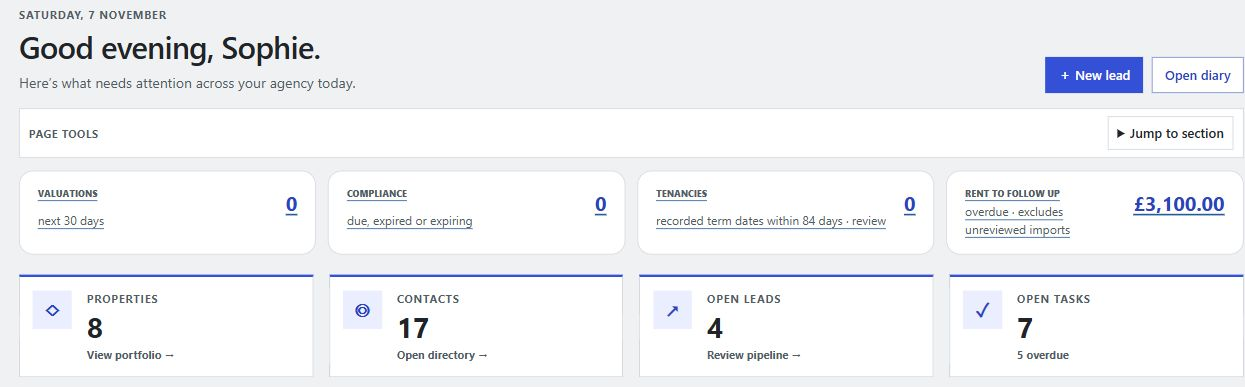
Open Today. Review appointments and tasks, then use the main menu to open Contacts, Properties and Leads. On a phone, use the menu button; on a small desktop you can collapse the main navigation. The search field finds an existing person, property or enquiry.
Understand the records
A contact is a person or company. A property is the home or premises. A lead is an enquiry or opportunity. A tenancy is a particular agreement and household at a property. A sales progression is a particular purchase. Link these records instead of retyping them.
Follow one complete example
Find a contact, open their linked property, read the communications and identify the next task. Check who is responsible and when it is due. Try the property’s section menu rather than returning to the main list for every action.
Finish with a handover
Before leaving a record, save the changes, record what happened and give the next action an owner and date. A read message or a saved note does not mean the customer’s request is finished.
Check before moving on
- Confirm that you are in the correct agency before entering data.
- Ask an administrator about missing sections; access depends on your role and enabled agency features.
- Do not use a shared staff account.
Worked example
A caller asks about a viewing. Search their email, open the contact and linked property, then review the appointment and messages before responding.
See it with your own agency.
Explore for one month without entering payment details, or ask us to demonstrate the workflow.